IDM Services API
IDM JWT Token Creation
DEV - http://idmservices.dev.ainqaplatform.in/IDMJWTTokencreation
Usage
This API used to generate jwt token with the API key.
Note: This API key will be configured in both DB and Frontside
This below request contains payload plus checksum, This checksum was generated from frontside.
Process to generate checksum
We have API key(“2d1ef604-cc39-42fd-8ba3-254bca7ee564”) configured in both frontend and backend side.
So, we will generate checksum by combine the payload and api key in single json and then convert it into MD5 encryption string format and then send that string into the payload in the field Checksum.
Request
{ "roleid": "PractitionerRole/10110", "facilityid": "Organization/10002", "locationid": "LocationMaster/10242", "orgid": "Organization/10001", "enterpriseid": "Organization/10000", "practitionerid": "Practitioner/10044", "personid": "Person/10268", "CheckSum": "010bbc2e78e8cf89ccedbe57eaf36129" }
Sample response
{ "Code": 201, "Result": "eyJ0eXAiOiJKV1QiLCJhbGciOiJub25lIn0.eyJyb2xlaWQiOiJQcmFjdGl0aW9uZXJSb2xlLzEwMTEwIiwiZmFjaWxpdHlpZCI6Ik9yZ2FuaXphdGlvbi8xMDAwMiIsImxvY2F0aW9uaWQiOiJMb2NhdGlvbk1hc3Rlci8xMDI0MiIsIm9yZ2lkIjoiT3JnYW5pemF0aW9uLzEwMDAxIiwiZW50ZXJwcmlzZWlkIjoiT3JnYW5pemF0aW9uLzEwMDAwIiwicHJhY3RpdGlvbmVyaWQiOiJQcmFjdGl0aW9uZXIvMTAwNDQiLCJwZXJzb25pZCI6IlBlcnNvbi8xMDI2OCJ9." }
GetPermissionforRoles
DEV - http://idmservices.dev.ainqaplatform.in/GetPermissionforRoles
Usage
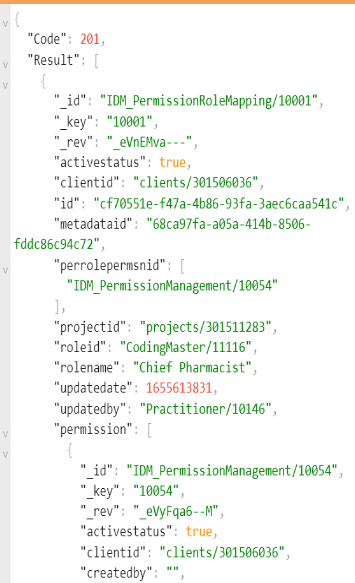
This API used to fetch all the permissions which was mapped to given role.
Request
{ "db_name": "primarycare", "roleid": "CodingMaster/11116" }
Sample response
Create Super Admin User
DEV - https://idmservices.dev.ainqaplatform.in/create_superadmin_user
Usage
This API used to create super admin user for both CLMM and Primarycare.
This API will create below documents in database
SuperAdmin userName - Superadminuser PermissionName - SUPER_ADMIN_ALL_ACCESS organizationName - Super_Admin_Organization LocationName - super admin user location LocationId - SUPER_ADMIN_LOCATION+UUID
After created super admin user in database, it will send a email with password update link to give email in the payload.
After update the password user can login to the application.
Dependencies of this API:
Before execute this API, we need to move the following collections with document.
- IDM_Repository
- CodeableconceptMaster
- CodingMaster
Request
{ "db_name":"primarycare", "metadataId":"04ecb73d-f048-44ce-8563-c9be015812dd", "email":"lesasi2952@weepm.com" }
Sample response
{ "Code": 201, "Result": "Super Admin user Created Successfully!" }
List IDM Repository
DEV - https://idmservices.dev.ainqaplatform.in/list_idmRepository
Usage
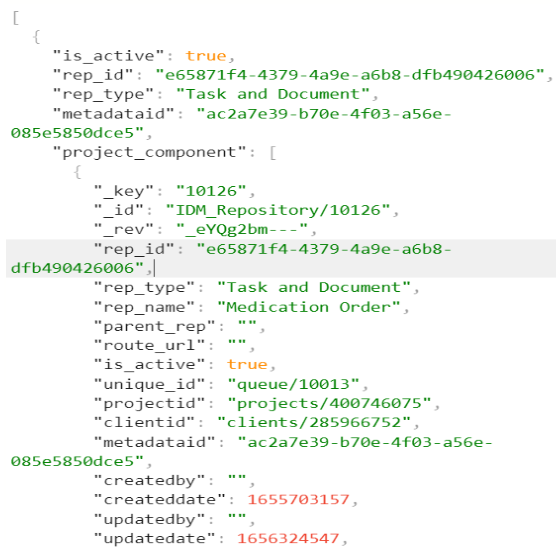
This API used to list all the records which was present in the IDM_Repository collection for given database
Request
{ "metadataid": "ac2a7e39-b70e-4f03-a56e-085e5850dce5", "db_name": "tdwandppqdb" }
Sample response
List IDM Repository Based On Given tenantid
DEV - https://idmservices.dev.ainqaplatform.in/v1/list_idmRepository
Usage
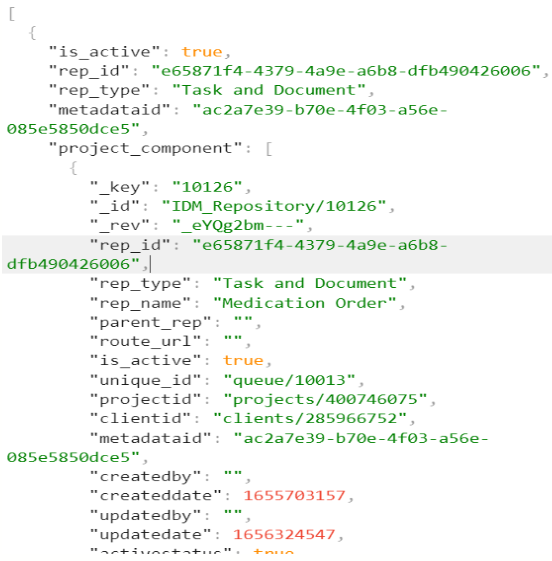
This API used to list all the records which was present in the IDM_Repository collection for given database
Request
{ "metadataid": "f44040b0-6a69-4749-9819-06c6d1ee8057", "db_name": "SurveillancePlatform", "tenantId": "client/10000", "parentrepoId": "IDM_Repository/10022" }
Sample response
Upsert Permission
DEV - https://idmservices.dev.ainqaplatform.in/upsert_permission
Usage
This API used to insert the records in the IDM_PermissionManagement collection for given database.
Request
[ { "db_name": "primarycare", "entity": "IDM_PermissionManagement", "is_metadata": true, "metadataId": "04ecb73d-f048-44ce-8563-c9be015812dd", "metadata_dbname": "ATP_Platform", "doc": { "permsnid": "54a57404-b528-42be-88f7-97dff397cf9b", "permsnname": "call center1", "status": true, "metadataid": "68ca97fa-a05a-414b-8506-fddc86c94c72", "clientid": "clients/301506036", "projectid": "projects/301511283", "permsn_repo": [ { "repoid": "IDM_Repository/10000", "permsnread": true, "permsnwrite": true, "permsnupdate": true, "permsndelete": true }, { "repoid": "IDM_Repository/10001", "permsnread": true, "permsnwrite": true, "permsnupdate": true, "permsndelete": true } ] } } ]
Sample response
{ "Code": 201, "Result": "Permission Added/Updated Successfully!" }
Add Role
DEV - https://idmservices.dev.ainqaplatform.in/add_role
Usage
This API used to insert the records in the IDM_PermissionRoleMapping collection for given database.
Request
[ { "db_name": "primarycare", "entity": "IDM_PermissionRoleMapping", "metadataId": "04ecb73d-f048-44ce-8563-c9be015812dd", "metadata_dbname": "ATP_Platform", "is_metadata": true, "doc": { "id": "string", "roleid": "string", "rolename": "string", "perrolepermsnid": [], "metadataid": "string", "clientid": "string", "projectid": "string" } } ]
Sample response
{ "Code": 201, "Result": "Role Added/Updated Successfully!" }
Upsert Repo
DEV - https://idmservices.dev.ainqaplatform.in/upsert_repo
Usage
This API used to insert the records in the IDM_Repository collection for given database.
Request
[ { "db_name": "primarycare", "entity": "IDM_Repository", "is_metadata": true, "metadataId": "04ecb73d-f048-44ce-8563-c9be015812dd", "metadata_dbname": "ATP_Platform", "doc": { "rep_id": "3ceb9bda-f928-4b72-89b7-7766f0b7e35a", "rep_type": "Task and Docment", "rep_name": "Medication Order", "parent_rep": "", "route_url": "", "is_active": true, "unique_id": "queue/10013", "createdby": "", "createddate": 1652331500, "updatedby": "", "updatedate": 1653372684, "activestatus": true, "metadataid": "08fbc6fb-2e13-4cd2-9e4a-be68ed717c9e", "clientid": "clients/285966752", "projectid": "projects/415219258" } } ]
Sample response
{ "Code": 201, "Result": "Repo Added/Updated Successfully!" }
Permission Soft Delete
DEV - https://idmservices.dev.ainqaplatform.in/permissionSoftDelete
Usage
This API used to delete the records in the IDM_PermissionManagement collection for given database.
Request
{ "db_name": "primarycare", "metadata_dbname":"ATP_Platform", "entity": "IDM_PermissionManagement", "filter": "IDM_PermissionManagement._key=='10001'" }
Sample response
{ "Code": 201, "Result": "permission Soft deleted Successfully!" }
Role Soft Delete
DEV - https://idmservices.dev.ainqaplatform.in/roleSoftDelete
Usage
This API used to delete the records in the IDM_PermissionRoleMapping collection for given database.
Request
{ "db_name": "primarycare", "metadata_dbname": "ATP_Platform", "entity": "IDM_PermissionRoleMapping", "filter": "IDM_PermissionRoleMapping._key=='10003'" }
Sample response
{ "Code": 201, "Result": "Role Soft deleted Successfully!" }
Get All Permission list
DEV - https://idmservices.dev.ainqaplatform.in/getAllPermissions
Usage
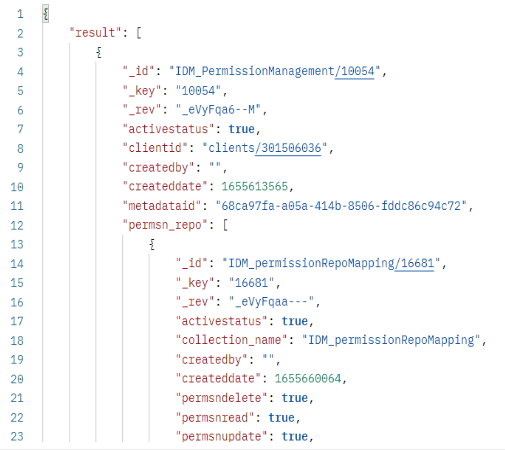
This API used to list all the records which was present in the IDM_PermissionManagement collection for given database.
Request
{ "db_name": "primarycare", "entity": "IDM_PermissionManagement" }
Sample response
Get Permission by ID
DEV - https://idmservices.dev.ainqaplatform.in/get_permissionById
Usage
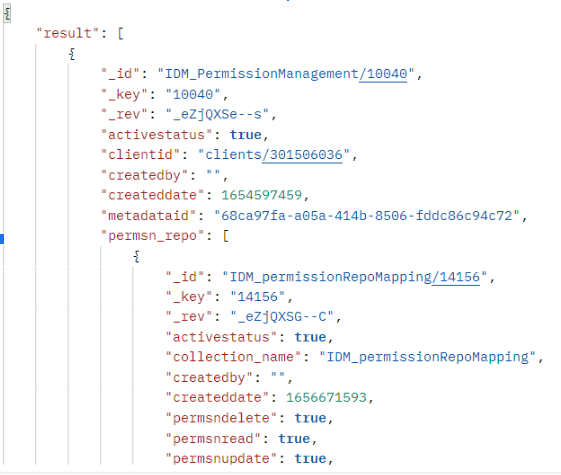
This API used to list the records for the particular ID which was present in the IDM_PermissionManagement collection for given database.
Request
{ "db_name": "primarycare", "entity": "IDM_PermissionManagement", "_id": "IDM_PermissionManagement/10040" }
Sample response
Get All Roles
DEV - https://idmservices.dev.ainqaplatform.in/getAllRoles
Usage
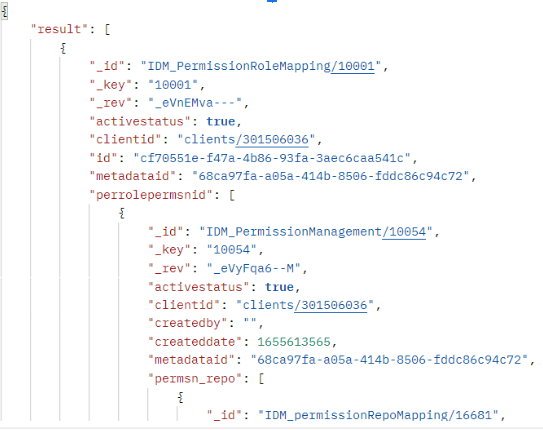
This API used to list all the records which was present in the IDM_PermissionRoleMapping collection for given database.
Request
{ "db_name": "primarycare", "entity": "IDM_PermissionRoleMapping" }
Sample response
Get Role by ID
DEV - https://idmservices.dev.ainqaplatform.in/get_roleById
Usage
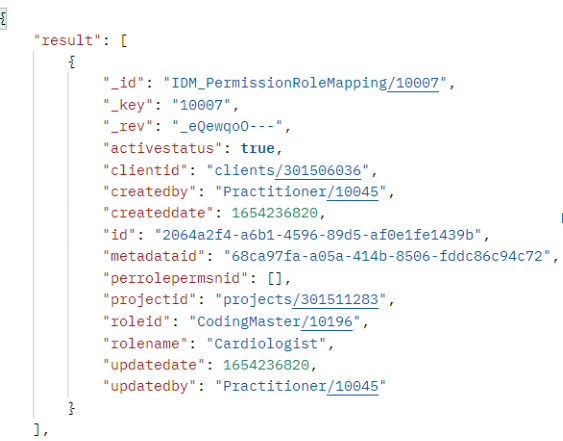
This API used to list the records for the particular ID which was present in the IDM_PermissionRoleMapping collection for given database.
Request
{ "db_name": "primarycare", "entity": "IDM_PermissionRoleMapping", "roleid": "CodingMaster/10196" }
Sample response
IDM Services Configuration
This document will explain the idm service configuration. We have placed all keycloack configuration in Arango Metadata database(ATP_Platform).
Configuration Setup
We have created the keycloack configuration in idm_configuration collection which was present in the ATP_Platform DB.
Sample screenshot for ipmo keyclock configuration document
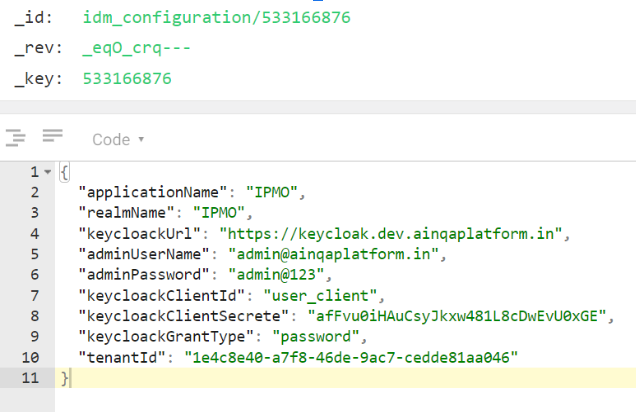
Here, tenanId will be the clientId, If we want to create email in keycloack, we have to configure the keycloack auth information in idm_configuration collection.
The emailId will create based on the tenantId configured in the idm_configuration collection.
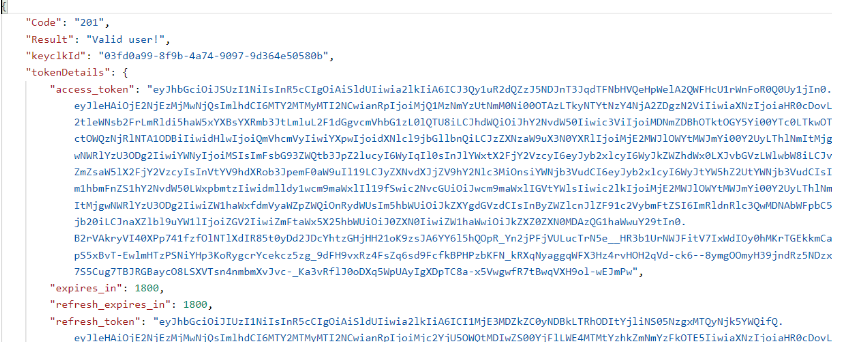
KeyCloack API
Login KeyCloack User
DEV - https://idmservices.dev.ainqaplatform.in/login_keycloackuser
Usage
This API used to check the given username was available or not in keycloack.
RequestBody
{ "username":"devtest003@mail.com", "password":"pass001" }
Request Header
tenantid: 1e4c8e40-a7f8-46de-9ac7-cedde81aa046
Note: pass clientId in tenantid field.
Sample response
Create User In KeyCloack
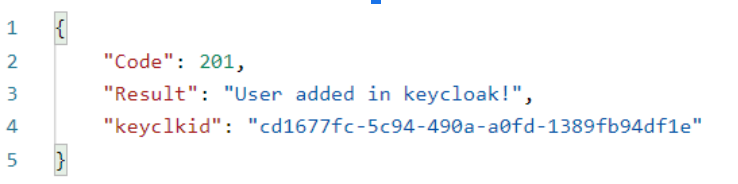
DEV - https://idmservices.dev.ainqaplatform.in/create_keycloack_user
Usage
This API used to create the given email to in keycloack.
The keycloack credentials will taken using the tenantId
RequestBody
{ "email": "devtest003@mail.com", "firstName": "dev", "lastName": "test" }
Request Header
tenantid: 1e4c8e40-a7f8-46de-9ac7-cedde81aa046
Note: pass clientId in tenantid field.
Sample response
Reset User Password In KeyCloack
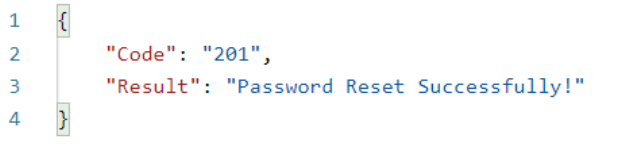
DEV - https://idmservices.dev.ainqaplatform.in/reset_keycloackuser
Usage
This API used to reset password for the given email to in keycloack.
The keycloack credentials will taken using the tenantId.
RequestBody
{ "email":"devtest003@mail.com", "password":"pass001" }
Request Header
tenantid: 1e4c8e40-a7f8-46de-9ac7-cedde81aa046
Note: pass clientId in tenantid field.
Sample response
Delete User In KeyCloack
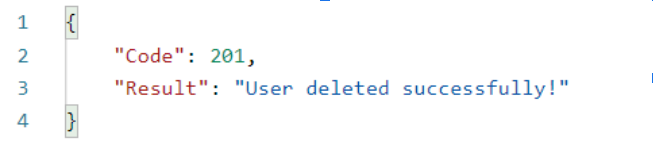
DEV - https://idmservices.dev.ainqaplatform.in/delete_keycloackuser
Usage
This API used to delete user for the given keycloackId.
The keycloack credentials will taken using the tenantId.
RequestBody
{ "keycloackId": "8a21ce91-107e-4689-88b7-77d6246b5793" }
Request Header
tenantid: 1e4c8e40-a7f8-46de-9ac7-cedde81aa046
Note: pass clientId in tenantid field.
Sample response
Person Soft Delete
DEV - https://idmservices.dev.ainqaplatform.in/person_soft_delete
Usage
This API used to soft delete the specific person records in the Person collection in given database.
RequestBody
{ "db_name": "eambulance", "entity": "Person", "metadata_dbname": "ATP_Platform", "metadataid": "37940c4f-0f66-4e18-b4c6-e402238b8935", "filter": "Person._key=='10019'" }
Request Header
tenantid: 04d7631b-3216-4a40-9821-b997b2ce0031
Note: pass clientId in tenantid field.
Sample response
{ "Code": 201, "Result": "Person soft deleted Successfully!" }